Ateneo-utils was born out of my own frustration with online enlistment. Back during my 2nd and 3rd year, when we were still getting the hang of scheduling classes and prioritizing sections, I dreaded the days I had to cross-reference the “Profs to Pick” Facebook group and manually draft my schedule in Sheets.
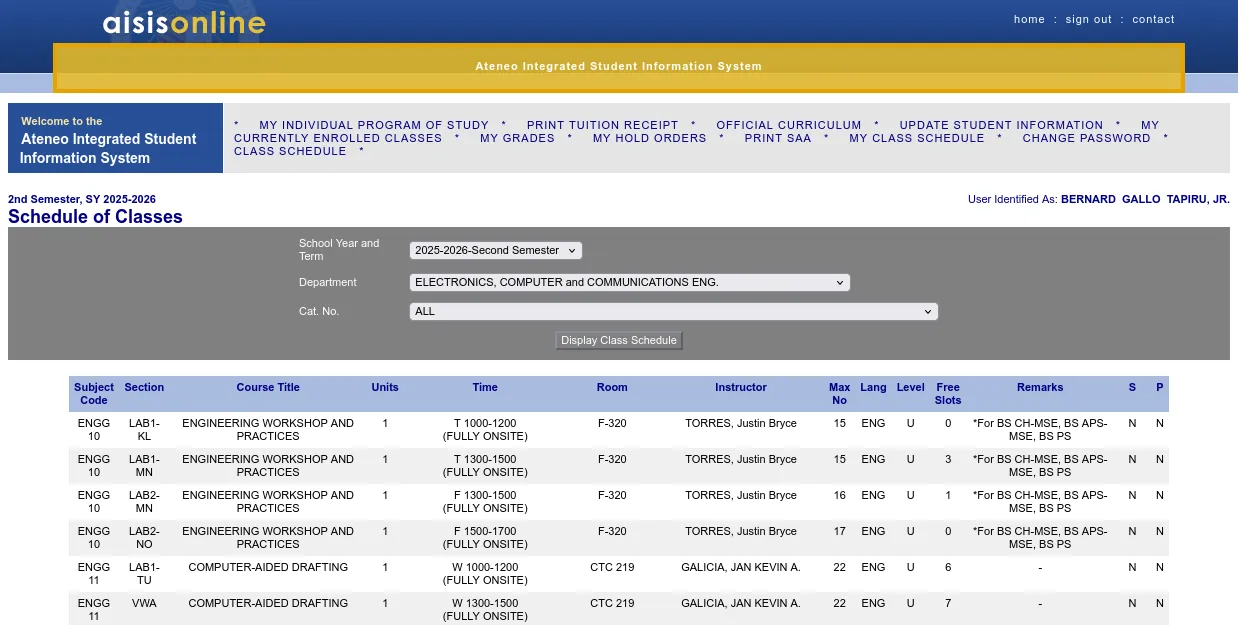
First, checking class schedules on AISIS was and still is incredibly cumbersome . For certain ISPs like Globe, AISIS loaded agonizingly slowly. Whenever a tab unloaded or I had to navigate to a new department’s page, I’d have to sit through another loading screen. AISIS isn’t exactly easy on the eyes, either. It uses small text on big screens, forces a desktop view on mobile, and lacks responsiveness. It’s also dangerously easy to mix up rows on the class schedule table, a mistake you often don’t realize until you’re actually enlisting.
UI and network latency aside, scheduling on spreadsheets felt too primitive. Manually allocating time slots on each row and merging cells based on class duration was tedious. Moving those cells around was a whole different story. Since you can never be certain you’ll get the class you’re eyeing, you have to list alternatives. Do you use dropdowns for cells? Multiple sheets? Given the sheer number of possible combinations and the constantly updating slot counts, I easily found myself procrastinating whenever I had to build my schedule.
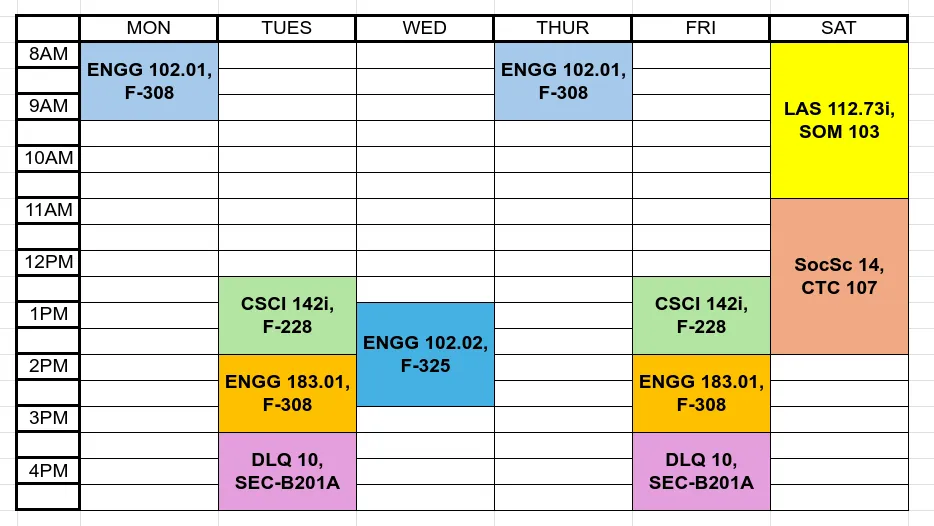
Here is an example of a compressed schedule I made to submit for one of my classes - this was already its simplest form.
Initially, I thought about building a dedicated class scheduler entirely within Microsoft Excel or Google Sheets. However, bending those applications to fit my UI/UX vision proved more difficult than just building a custom web app from scratch.
That led to the first version of ateneo-utils, which was purely a class scheduler. Back in June 2025, I tried a serverless approach using Vercel. I scraped the class schedules using Beautiful Soup and stored the JSON data in a GitHub Gist . The catch? I had to run the Python scraper manually on my machine and push the updated Gist to GitHub every single time. Even though it was cobbled together, my friends and classmates loved the scheduling flow. At the time, though, I only had minimal knowledge of frontend technologies, so I couldn’t make the experience as smooth as I wanted.
Fast-forward to December 2025. I originally aimed to deploy a better version before online enlistment, but I got tied up with my application journey for the Loyola Mountaineers. I eventually used the Christmas break to refine it, expanding the project into two distinct tools: a class-scheduler and a grade-calculator.
By this point, I already had a VPS running with Dokploy, which I use to host my digital library, streaming services, and other life-essential apps. Since I already owned a domain, I started looking into a more permanent deployment for the student body. One strict requirement was that the app had to be as lightweight as possible to avoid eating up the memory my other self-hosted apps relied on. I decided to go with NextJS and Prisma, a stack I was already comfortable with from building Blueship. React was the perfect fit because the class-scheduler required complex state management for time-blocking and syncing local class data with the remote server.
The React ecosystem also provided great community libraries. I used TypeScript with Zod to ensure type safety, and Zustand to manage global states, which were essential for dragging classes around, evaluating alternative schedules, and caching the classes fetched from the server. For the UI, I used Shadcn, though I heavily customized it to resemble Duolingo’s interface because I loved that intuitive, educational feel. Most importantly, I integrated FullCalendar for the core scheduling view. These tools allowed me to iterate incredibly quickly. Since my goal was to offload as much processing and data storage to the client side as possible, building a “fat-client” even with a slightly larger bundle size was an acceptable trade-off.
For the new scraper, I ditched Python in favor of Go. Go’s lighter memory footprint and test-driven workflow were huge advantages. It allowed me to host a perpetual microservice that scraped the university website without hogging server memory, and it easily interfaced with my NodeJS service via Go’s web APIs. This new scraper simply listens for a trigger from my admin portal and then scrapes the class data (running single-threaded, as the university website blocks concurrent connections ). Writing the parser in Go was surprisingly fast since I had already done the heavy lifting of analyzing the HTML structure during my Python iteration. Architecturally, the Go scraper manages stateful sessions across the legacy JSP portal, employing goroutines to fetch data across departments while maintaining a single session context.
// From internal/scraper/engine.go: Concurrency with session safety
func (e *Engine) Run(semesterID string, semesterName string) error {
        jobs := make(chan domain.Department, len(depts))
        results := make(chan scrapeResult, len(depts))
        var wg sync.WaitGroup

        for i := 0; i < e.workers; i++ {
                wg.Add(1)
                // Worker pool ensures we don't overwhelm the university server
                go e.workerWithRetry(id, jobs, semesterName, results, &wg)
        }

        for _, d := range depts { jobs <- d }
        close(jobs)
        // ... (result aggregation logic)
}
My overarching architectural goal was to host a fat-client web app that only queries the server once for the absolutely necessary class schedules (users either upload their Individual Program of Study or manually search for classes). I expected a surge of simultaneous users right before enlistment season, and this approach prevented my VPS from getting overwhelmed. Because the bulk of the app is just client-side logic, it remains fully operational once the initial class data is cached in browser storage. Even without an active internet connection, the loaded app works flawlessly.
Another key requirement was restricting access to ADMU students so the scraped
class repository remained private. I didn’t want to build or maintain a custom
auth service from scratch, so I opted for Google OAuth. Since the university
provides a student-privileged email domain, I simply restricted logins to users
with an @*.ateneo.edu email address.
Scaling this to over a hundred users also meant getting serious about privacy, terms of service, data retention policies, and PII encryption to comply with google’s OAuth requirements. Fortunately, the fat-client model made this much easier: I don’t store any user data on my servers. Saved preferences and scheduled classes live entirely in the user’s local browser storage.
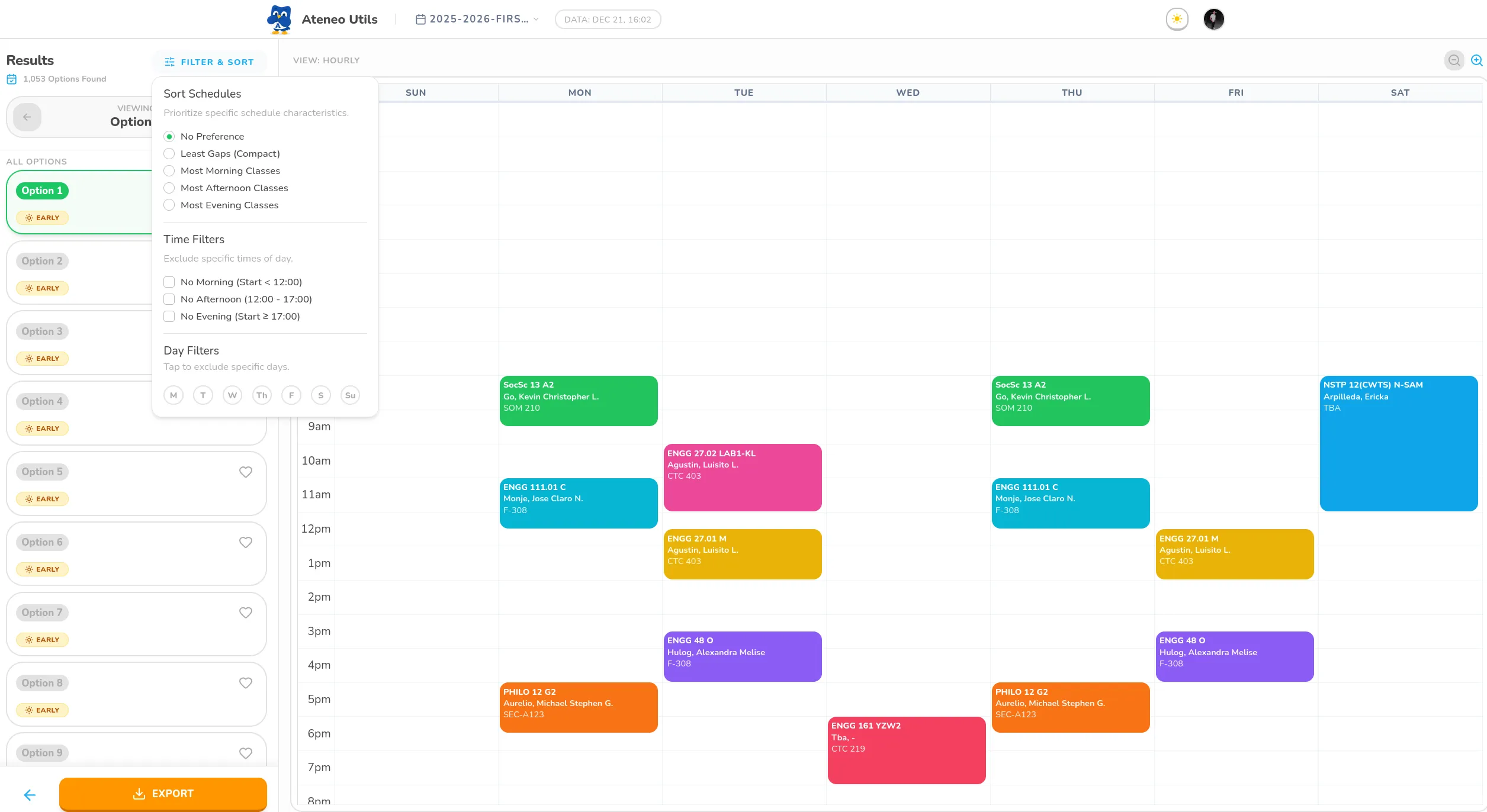
The main technical challenge was optimizing all that client-side logic to ensure it ran smoothly even on slower devices. To solve this, I designed a scheduling engine that first compresses sections of the same class (if they share the exact same time slots) into a single, section-agnostic block. This logic utilizes a unique hashing algorithm to group identical time-slots, significantly reducing the search space for the backtracking algorithm.
// From class-scheduler/engine.ts: Optimization via hashing
function getScheduleHash(cls: SchedulableClass): string {
  const sortedIds = cls.timeSlots.map(s => s.timeSlot.id).sort();
  return sortedIds.join("|");
}

export function compressCourses(
  allSections: SchedulableClass[]
): TimeslotGroup[] {
  const groups: Record<string, TimeslotGroup> = {};
  for (const section of allSections) {
    const hash = getScheduleHash(section);
    if (!groups[hash]) {
      groups[hash] = {
        id: hash,
        scheduleHash: hash,
        sections: [],
        representative: section,
      };
    }
    groups[hash].sections.push(section);
  }
  return Object.values(groups);
}
This drastically reduced the number of possible schedule combinations the app had to calculate. The engine only decompresses these time slots at the very end to display the final combinations. To further prevent the UI from freezing, I offloaded these intensive combinatorial searches to background Web Workers .
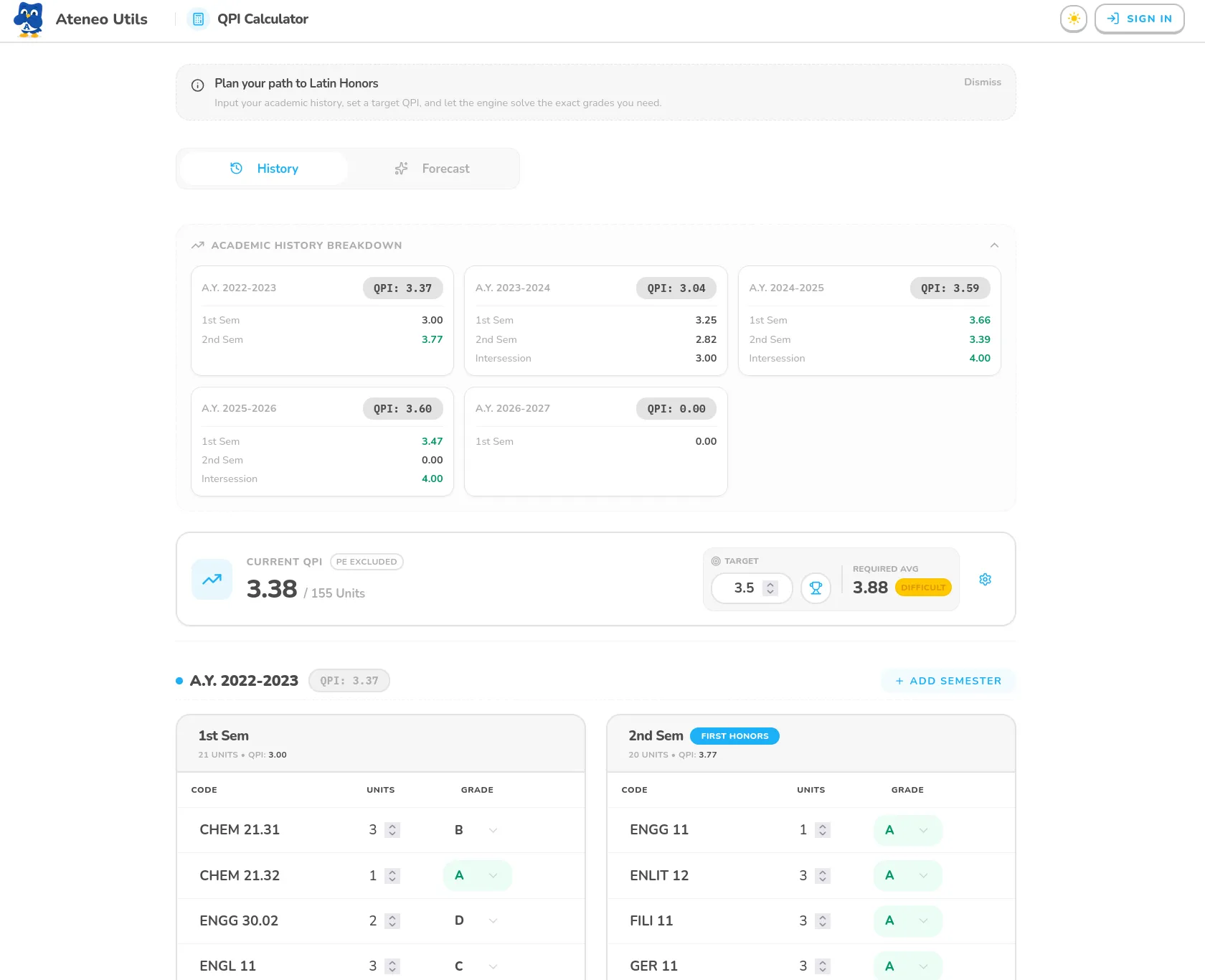
The Grade Calculator was another area where I went beyond simple arithmetic. It includes a reverse-scenario solver that finds every possible grade combination to reach a target QPI. To make the results useful, I implemented statistical categorization to identify “Safe” paths (consistent grades) versus “High Variance” paths (requiring heroic efforts like an A to balance a D).
// From grade-calculator/solver-engine.ts: Statistical categorization
export function categorizeScenarios(scenarios: ScenarioDistribution[]) {
  const scored = scenarios.map(s => {
    // ... (calculate mean and variance for each scenario)
    return { scenario: s, mean, variance };
  });

  // "Safe" paths prioritize lowest variance (consistency)
  const safe = [...scored].sort((a, b) => a.variance - b.variance).slice(0, 3);

  // "High Variance" paths are high-risk/high-reward
  const highVariance = [...scored]
    .sort((a, b) => b.variance - a.variance)
    .slice(0, 3);

  return { safe, highVariance };
}
Because the grade calculator allows for rapid manual entry, the computations could become heavy as the user inputs their entire academic history. To maintain a fluid 60FPS UI, I moved all the heavy math (grouping by semester, calculating QPI breakdowns, and solving for cumulative stats) into a dedicated Web Worker. This ensures that the main thread stays dedicated to handling user input and UI transitions without jitter.
// From grade-calculator/calculator.worker.ts: Offloading computations
addEventListener("message", (event: MessageEvent<CalculatorWorkerMessage>) => {
  try {
    // Heavy calculations performed in background
    const result = performCalculations(event.data);
    const response: CalculatorWorkerResponse = {
      type: "STATS_RESULT",
      data: result,
    };
    // Sync back to main thread via message passing
    postMessage(response);
  } catch (error) {
    console.error("Calculator Worker Error:", error);
  }
});
The remaining bulk of the work went into refining the UI/UX, ensuring that advanced features like scheduling, prioritization, filtering, and sorting remained intuitive. Today, the class scheduler is fully live, and thanks to the admin dashboard and OAuth, I can easily trigger fresh data scrapes remotely from anywhere.